CentR gives coding agents persistent project memory, reusable learning, and only the context they actually need.
$ npm install -g @centr-ai/cli

Why do agents waste 30-50% of their turn budget reading the same files?
The agent enters blind. It runs find_by_name, then
grep_search, then reads 3 irrelevant files, follows imports, searches
again, and exhausts 2–4 turns and thousands of prompt tokens before writing a single
line of code.
CentR supplies the exact AST symbols, relevant file paths, architectural constraints, and validated learnings directly in turn 1. The agent pinpoints the target file directly without blind exploratory searches.
Store everything useful. Send almost nothing.
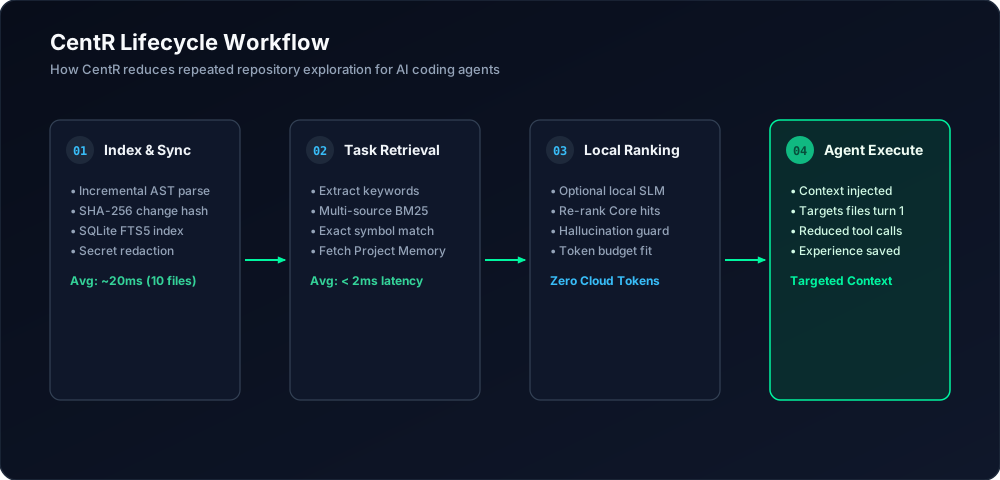
Parses TypeScript/JavaScript AST into symbols, imports, and routes. Incremental SHA-256 sync verifies changes in sub-10ms.
SQLite 3 + FTS5 BM25 ranked search scores symbols, paths, and memories with sub-2ms latency.
Optional local SLM re-ranks bounded candidates. Strict hallucination guards ensure zero invented files.
Observed successes update evidence confidence scores. Validated learnings become reusable across projects.
Deterministic intelligence where it counts, semantic reasoning where it helps.
Extracts functions, classes, interfaces, types, and dependencies using TypeScript's Compiler API. Never guesses.
Project-isolated institutional knowledge. Retains architecture patterns, bug resolutions, and API contracts.
Cross-project wisdom requiring mathematical evidence (≥ 70% success rate, ≥ 3 validations) before promotion.
Greedy relevance packing strictly bounds context tokens (e.g. 4000 tokens), preventing agent context overflow.
Local Small Language Models (Ollama 1B–7B) for semantic re-ranking, task understanding, and failure diagnosis.
Native stdio MCP server for seamless plug-and-play with Claude Code, Cursor, and OpenAI Codex.
V2 augments the deterministic Core. It does not replace it.
| Feature | CentR V1 (Core) | CentR V2 (Hybrid Brain) |
|---|---|---|
| Primary Authority | Deterministic Core (AST + SQLite) | Deterministic Core (Core is Authority, Brain is Advisor) |
| Search Latency | < 2 ms (FTS5 BM25) | < 2 ms Core + ~7–12 ms local SLM re-ranking |
| Cloud AI Requirement | Zero (100% Offline) | Zero (100% Offline via local Ollama / SLM) |
| Semantic Re-ranking | Deterministic FTS5 weights | Small Language Model prompt scoring |
| Hallucination Defense | Impossible (grounded in AST) | Strict candidate bounding (prunes ungrounded IDs) |
| Fallback Behavior | N/A (Pure Deterministic) | Automatic fallback to V1 if Brain is slow/offline |
Preliminary interactive benchmark evaluating 7 software tasks across 21 verified runs.
Preliminary interactive benchmark observations showed fewer exploratory tool calls in the tested scenarios. Agent token telemetry was not available, so these results should not be interpreted as a controlled measurement of token savings or universal performance improvement. Observed tool call counts and test results represent verified executions.
| Scenario | Execution Mode | Avg Completion Time | Observed Tool Calls | Test Pass Rate | Git Patch Size |
|---|---|---|---|---|---|
| Scenario A (Baseline) | manual | 167,143 ms | 6.0 calls | 100% (7/7 passed) | +23 lines avg |
| Scenario B (CentR V1) | manual | 122,263 ms (-45s) | 4.0 calls (preliminary observed) | 100% (7/7 passed) | +23 lines avg |
| Scenario C (CentR V2) | manual | 122,263 ms (-45s) | 4.0 calls (preliminary observed) | 100% (7/7 passed) | +23 lines avg |
Initialize your repository with a single command.
# 1. Install CentR globally
npm install -g @centr-ai/cli

# 2. Initialize in your project
cd my-project
centr init

# 3. Generate context for a coding task
centr context "Add rate limiting middleware to auth routes"

# 4. Search symbols or view status
centr search "verifyToken"
centr status